Project Scope
Responsive web
App
Role
Product designer
Deliverables
Research
Interview
Wireframe
High Fidelity
Tools
Figma
Duration
4 months
Project Scope
Responsive web
App
Role
Product designer
Deliverables
Research
Interview
Wireframe
High Fidelity
Tools
Figma
Duration
4 months
Project Scope
Responsive web
App
Role
Product designer
Deliverables
Research
Interview
Wireframe
High Fidelity
Tools
Figma
Duration
4 months
Overview
Overview
It is quite difficult to enable productive feedback procedures for creators and their partners in the field of video production and editing. Currently, the effective creation and refinement of video material are hampered by the lack of a streamlined platform for reviewing and giving frame-by-frame feedback on video work. Miscommunication, time-consuming revisions, and a lack of centralized resources are problems caused by this market gap, which affects the output and caliber of video productions. Wisecut is a video collaborative platform for people to get reviews on video work. People working with video editors can use this to review and give feedback on videos till it's ready
It is quite difficult to enable productive feedback procedures for creators and their partners in the field of video production and editing. Currently, the effective creation and refinement of video material are hampered by the lack of a streamlined platform for reviewing and giving frame-by-frame feedback on video work. Miscommunication, time-consuming revisions, and a lack of centralized resources are problems caused by this market gap, which affects the output and caliber of video productions. Wisecut is a video collaborative platform for people to get reviews on video work. People working with video editors can use this to review and give feedback on videos till it's ready
Creator's View
Creator's View
Project dashboard
Project dashboard
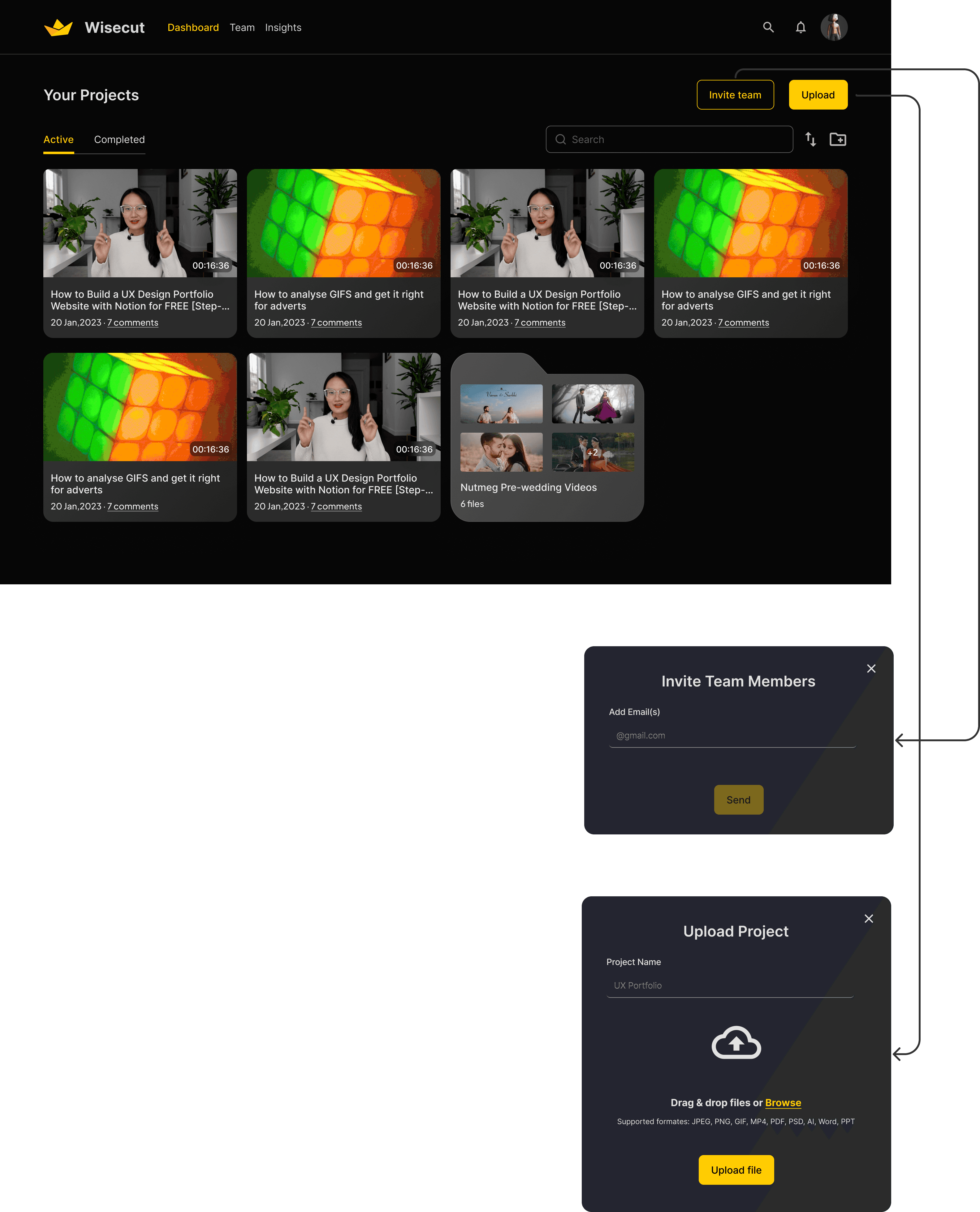
On this screen, video owners can access a comprehensive list of their projects, including both active and completed ones. On this page, they have several key functions, primarily the ability to invite collaborators and upload new projects. Additional functions encompass organizing files in a preferred order, utilizing search functionality, creating dedicated folders for clients with multiple projects, and easily identifying projects with new comments before opening them.
On this screen, video owners can access a comprehensive list of their projects, including both active and completed ones. On this page, they have several key functions, primarily the ability to invite collaborators and upload new projects. Additional functions encompass organizing files in a preferred order, utilizing search functionality, creating dedicated folders for clients with multiple projects, and easily identifying projects with new comments before opening them.
Playing video
Playing video
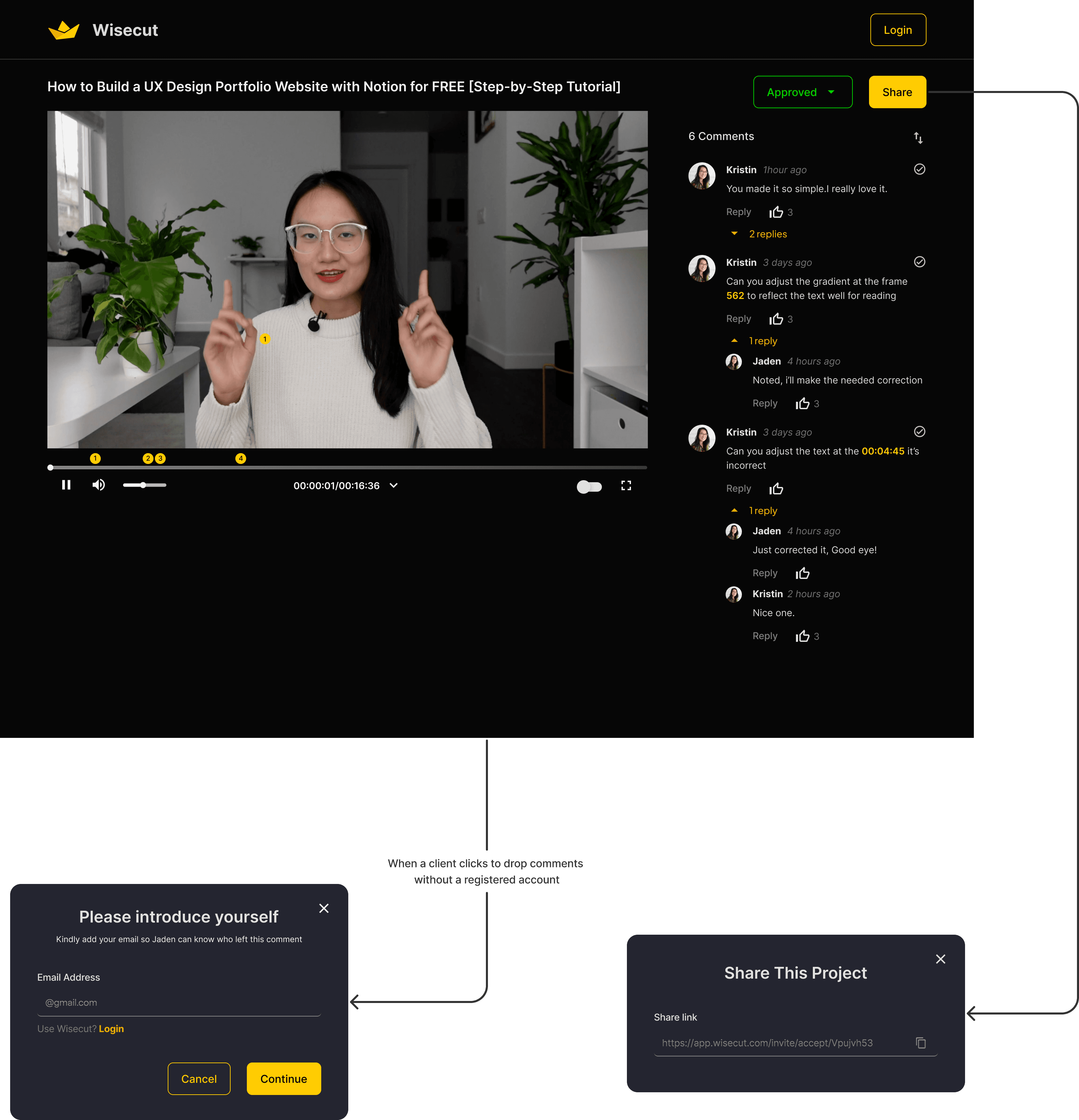
Upon opening a video, both clients and video editors have the ability to leave comments visible to others for discussion. They can choose to view the video either frame by frame or by traditional time format. Sharing the file is made simple, as they can copy the link or send direct invitations. Additionally, users can leave frame-specific comments on the screen to enhance clarity and facilitate a better understanding of their points.
Upon opening a video, both clients and video editors have the ability to leave comments visible to others for discussion. They can choose to view the video either frame by frame or by traditional time format. Sharing the file is made simple, as they can copy the link or send direct invitations. Additionally, users can leave frame-specific comments on the screen to enhance clarity and facilitate a better understanding of their points.

Onscreen comment can be dropped and seen at an exact time and frame.
This shows whenever the cursor is hovering over the playing video to let the user know they can drop a comment at that exact place.
The user will be able to toggle between the standard time format or the frame-by-frame format.
This allows the user to turn on or turn off the onscreen comments at will.
User gets to go full screen mode if they so choose.
The user clicks this to show that a particular comment has been resolved
Onscreen comment can be dropped and seen at an exact time and frame.
This shows whenever the cursor is hovering over the playing video to let the user know they can drop a comment at that exact place.
The user will be able to toggle between the standard time format or the frame-by-frame format.
This allows the user to turn on or turn off the onscreen comments at will.
User gets to go full screen mode if they so choose.
The user clicks this to show that a particular comment has been resolved
Frame-by-Frame view
Frame-by-Frame view

Client's View
Client's View
Client's View