Back to home
CLEAR SPEECH
CLEAR SPEECH
Clear speech is an app that helps to bridge the communication gap for speech impaired people.
Clear speech is an app that helps to bridge the communication gap for speech impaired people.

Project Scope
Project Scope
App
Role
Role
Product designer
Deliverables
Deliverables
Research
Wireframe
High Fidelity
Tools
Tools
Figma
Duration
Duration
1 Week
Overview
Overview
Overview
Many individuals face significant challenges in effectively communicating their thoughts and needs due to speech and language difficulties. These communication barriers can lead to frustration, isolation, and misunderstandings, making it challenging for both the affected individuals and their listeners to engage in meaningful conversations. In many cases, the nuances of what these individuals attempt to convey remain unintelligible to the average ear, necessitating close proximity to even begin deciphering their messages. This inability to express themselves clearly and the corresponding difficulty in understanding their speech hinders their ability to participate fully in social, educational, and professional settings.
Amid this challenge lies an opportunity to enhance the lives of countless individuals with speech and language difficulties. The development of an innovative solution has the potential to empower these individuals.
Many individuals face significant challenges in effectively communicating their thoughts and needs due to speech and language difficulties. These communication barriers can lead to frustration, isolation, and misunderstandings, making it challenging for both the affected individuals and their listeners to engage in meaningful conversations. In many cases, the nuances of what these individuals attempt to convey remain unintelligible to the average ear, necessitating close proximity to even begin deciphering their messages. This inability to express themselves clearly and the corresponding difficulty in understanding their speech hinders their ability to participate fully in social, educational, and professional settings.
Amid this challenge lies an opportunity to enhance the lives of countless individuals with speech and language difficulties. The development of an innovative solution has the potential to empower these individuals.

Objective
Objective
The objective of the project is to create an innovative app that empowers people with speech and language difficulties by providing them with a means to effectively communicate their thoughts and needs. Additionally, the app aims to improve understanding and engagement for those who interact with them.
The key challenge lies in creating a versatile app that can adapt to the diverse needs of users with varying speech difficulties. A successful solution will require customization options to ensure effectiveness for a wide range of individuals.
The objective of the project is to create an innovative app that empowers people with speech and language difficulties by providing them with a means to effectively communicate their thoughts and needs. Additionally, the app aims to improve understanding and engagement for those who interact with them.
The key challenge lies in creating a versatile app that can adapt to the diverse needs of users with varying speech difficulties. A successful solution will require customization options to ensure effectiveness for a wide range of individuals.
User Story
User Story
User Story
Amaka is a 16 year old, who ia unable to make out complete sentences to the extent that the average ear is unable to pick or understand what she tries to say unless you place your ear very close to her face.
Amaka is a 16 year old, who ia unable to make out complete sentences to the extent that the average ear is unable to pick or understand what she tries to say unless you place your ear very close to her face.

She is trying to speak but her words are fragmented and unclear. People around her struggle to understand.

She is struggling to express her thoughts. Her friends and family look concerned but unable to help.
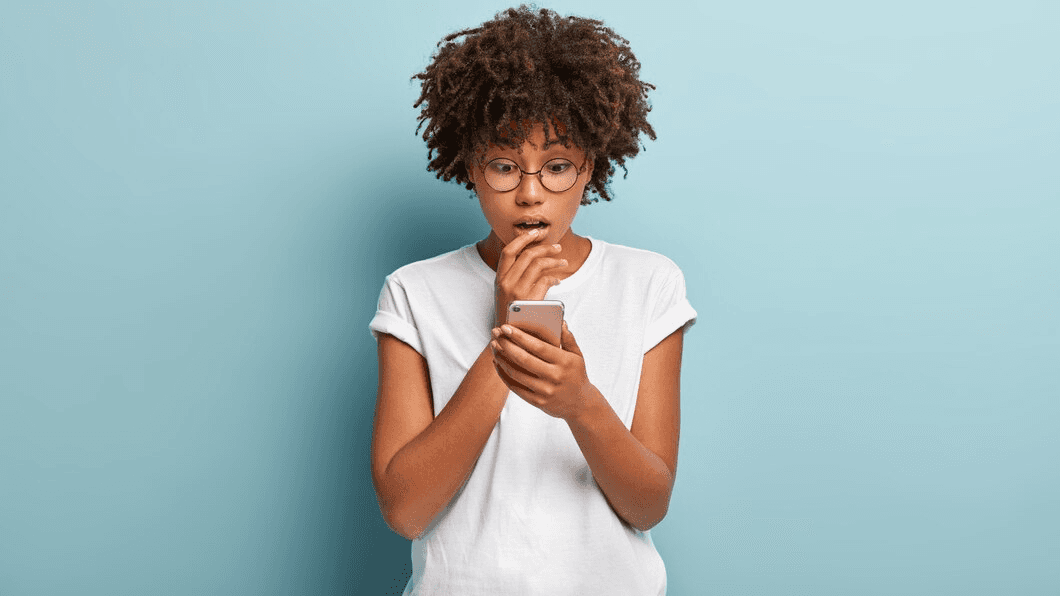
She discovers an app that can assist in speech interpretation. She looks intrigued.

She speaks into app, and her words appear clearly on the screen, making it easier for her friends and family to understand.

She is seen conversing with her friends, and they respond with smiles and understanding. The app has bridged the communication gap.

She is now confidently expressing herself, empowered by the app. Her friends and family listen attentively, and she is happy
Design Decisions
Design Decisions
Design Decisions
These user interface designs represent the outcomes of my design approach, significantly influenced by iterative research findings. Instead of relying on personal preferences or biased assumptions, my emphasis was on user-centricity. The objective of this user-centered design approach was to craft solutions that genuinely fulfilled the requirements and anticipations of the intended audience.
These user interface designs represent the outcomes of my design approach, significantly influenced by iterative research findings. Instead of relying on personal preferences or biased assumptions, my emphasis was on user-centricity. The objective of this user-centered design approach was to craft solutions that genuinely fulfilled the requirements and anticipations of the intended audience.
Onboarding
Onboarding
After the user signs up to the app. There are 4 steps to take before being able to access the app fully.
Permissions
The platform requires permission to access the microphone, storage, and background activity.
Microphone: This permission is required for the speech-to-text feature.
Storage: This permission is required for the user to save translations and for the platform to store a personalized voice model.
Background activity: This permission is required for the floating button(if the user does activate it) to work.
Voice Model and Language Selection
The user can select the voice model and language of their choice. The voice model determines the quality of the speech-to-text transcription, and the language determines the language of the transcription.
Tutorial
The user will be given a clear and very short training that will ensure that they fully understand how to use the platform efficiently and train it to assist the platform in becoming familiar with the user's distinct voice.
After the user signs up to the app. There are 4 steps to take before being able to access the app fully.
Permissions
The platform requires permission to access the microphone, storage, and background activity.
Microphone: This permission is required for the speech-to-text feature.
Storage: This permission is required for the user to save translations and for the platform to store a personalized voice model.
Background activity: This permission is required for the floating button(if the user does activate it) to work.
Voice Model and Language Selection
The user can select the voice model and language of their choice. The voice model determines the quality of the speech-to-text transcription, and the language determines the language of the transcription.
Tutorial
The user will be given a clear and very short training that will ensure that they fully understand how to use the platform efficiently and train it to assist the platform in becoming familiar with the user's distinct voice.

Navigation
Navigation
After the user gets into the app, he/she sees the three main navigations, namely;
Home/History: This navigation displays the user's history of speech-to-text transcriptions. Users can also play back the audio recordings of their speech to reuse them. This screen also features the settings icon.
After the user gets into the app, he/she sees the three main navigations, namely;
Home/History: This navigation displays the user's history of speech-to-text transcriptions. Users can also play back the audio recordings of their speech to reuse them. This screen also features the settings icon.


Speech to Text: This is the primary feature of the platform and it is designed to be a prominent, centrally positioned, round button designed to catch the user's attention. This button serves as the gateway to initiate a new speech-to-text transcription. Users can simply speak into their mobile device, and the platform will automatically convert their spoken words into text. Additionally, users have the flexibility to edit the transcribed text and even convert it into audio for playback to others.
Speech to Text: This is the primary feature of the platform and it is designed to be a prominent, centrally positioned, round button designed to catch the user's attention. This button serves as the gateway to initiate a new speech-to-text transcription. Users can simply speak into their mobile device, and the platform will automatically convert their spoken words into text. Additionally, users have the flexibility to edit the transcribed text and even convert it into audio for playback to others.

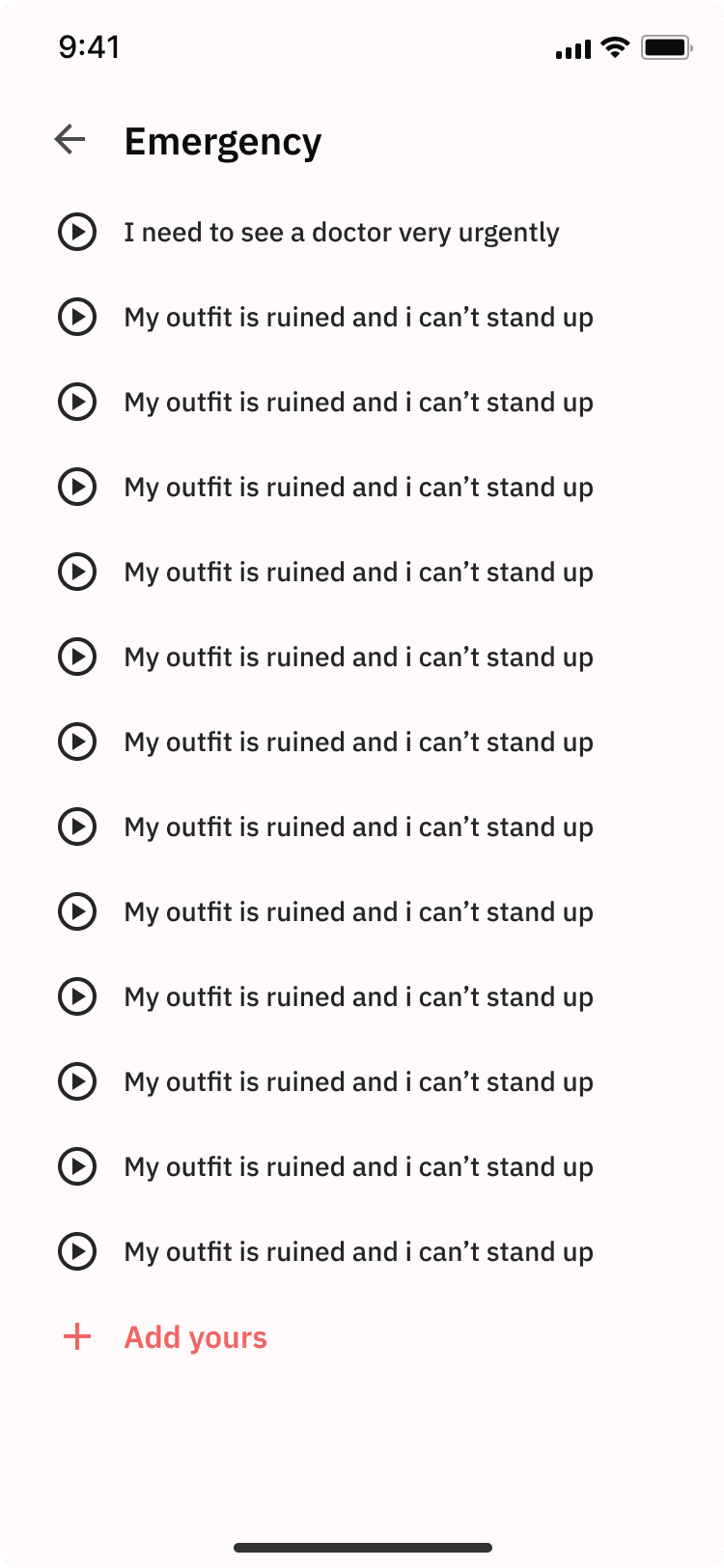
Assisted cards: This navigation provides a list of pre-recorded phrases that the user can use to communicate. The phrases are organized into categories such as food, emergency, toilet, and school e.t.c while also adding their desired categories with their own phrases or adding their own phrases to already created categories.
Assisted cards: This navigation provides a list of pre-recorded phrases that the user can use to communicate. The phrases are organized into categories such as food, emergency, toilet, and school e.t.c while also adding their desired categories with their own phrases or adding their own phrases to already created categories.

Settings
Settings
Two vital features are integrated into the settings, and due to their significance, they are prominently displayed on the app's homepage for easy accessibility.
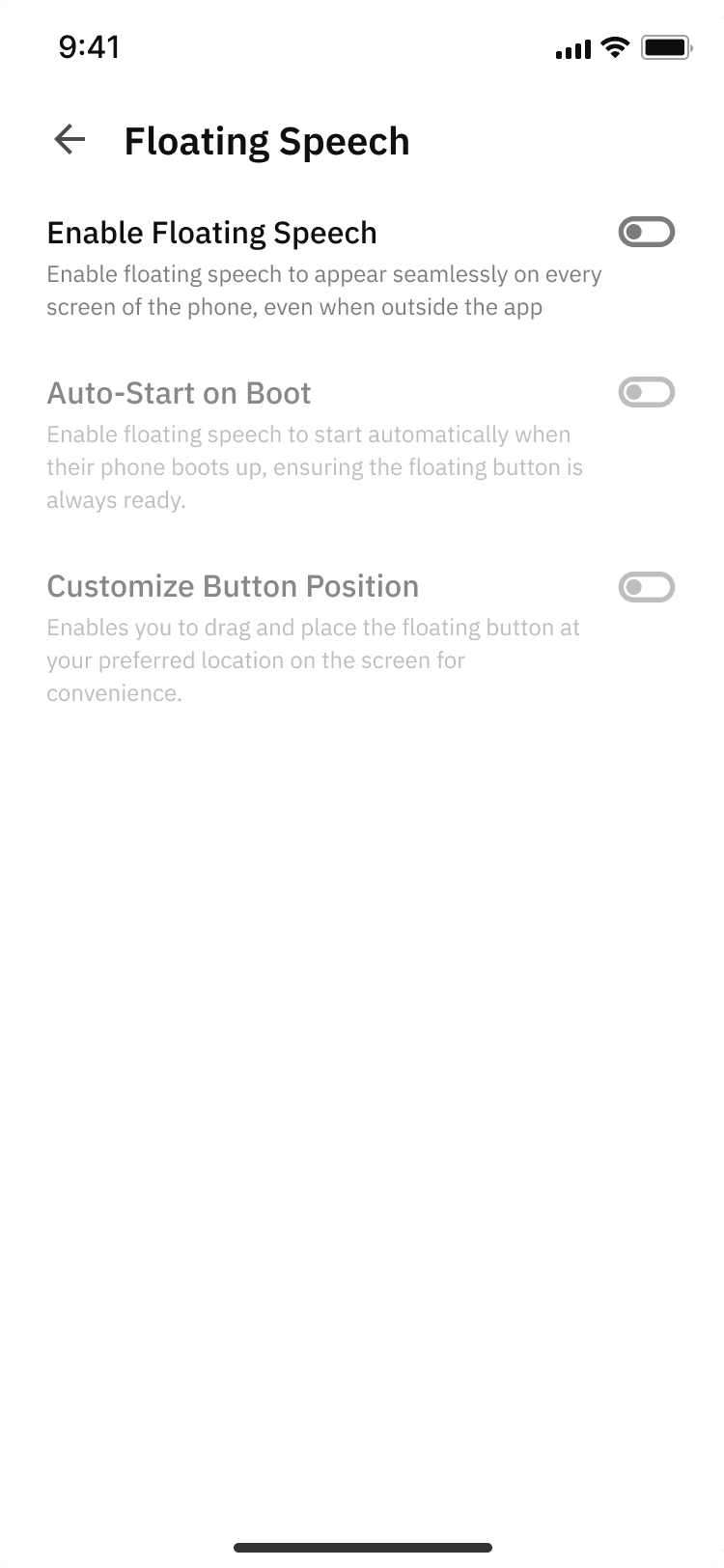
Personal Voicebox: Users have the option to personalize their voicebox by adding pre-recorded words and their corresponding phrases. This feature empowers users to build a custom vocabulary tailored to their unique requirements. When users speak these pre-recorded words, the associated phrases automatically appear in the speech-to-text interface. This enhancement enhances their experience, making it more enjoyable and adaptable to their specific needs.
Two vital features are integrated into the settings, and due to their significance, they are prominently displayed on the app's homepage for easy accessibility.
Personal Voicebox: Users have the option to personalize their voicebox by adding pre-recorded words and their corresponding phrases. This feature empowers users to build a custom vocabulary tailored to their unique requirements. When users speak these pre-recorded words, the associated phrases automatically appear in the speech-to-text interface. This enhancement enhances their experience, making it more enjoyable and adaptable to their specific needs.

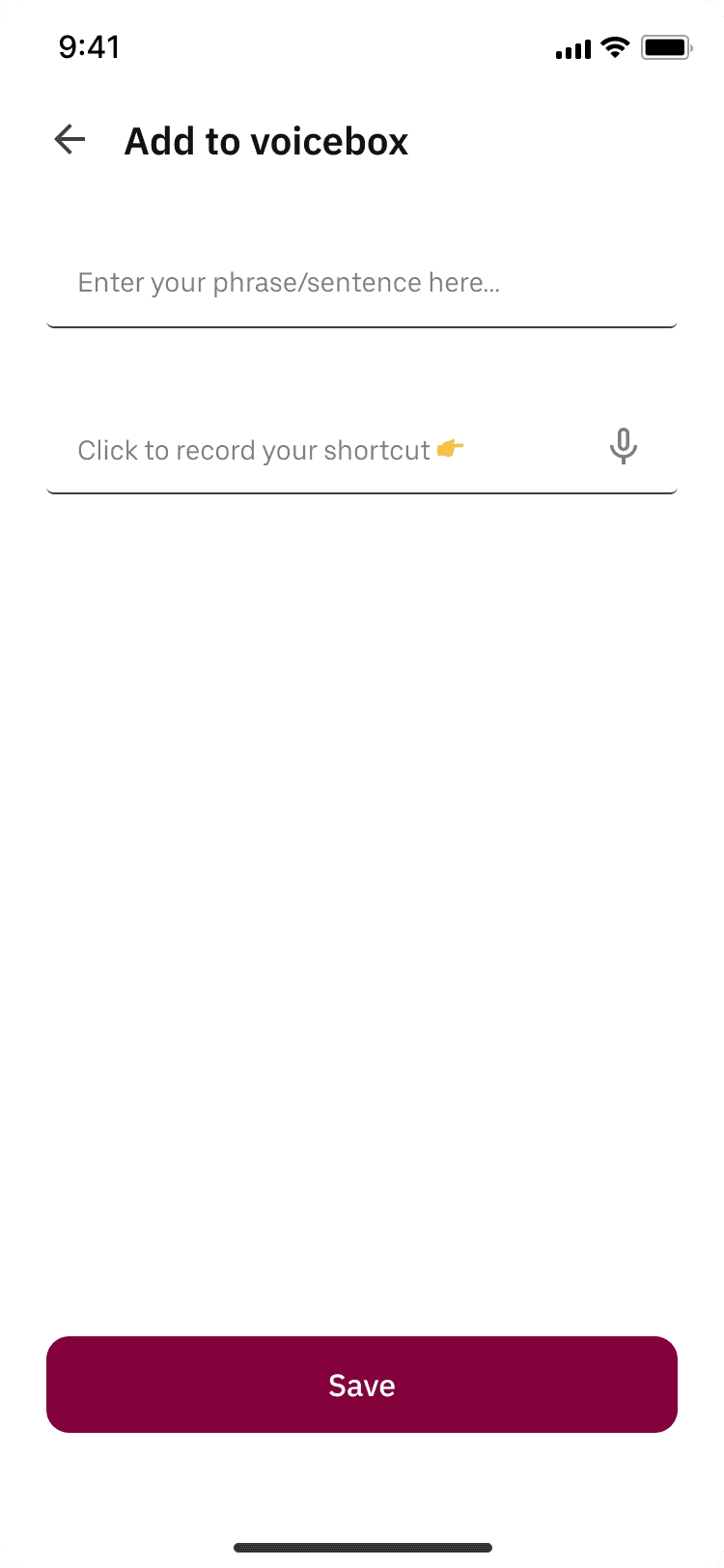


Floating Button: Users have the option to activate a floating speech button that grants them instant access to the speech-to-text interface, available from any screen on their phone. This feature proves particularly advantageous for users seeking quick and hassle-free communication, eliminating the need to repeatedly locate and open the app whenever they wish to use it.
Floating Button: Users have the option to activate a floating speech button that grants them instant access to the speech-to-text interface, available from any screen on their phone. This feature proves particularly advantageous for users seeking quick and hassle-free communication, eliminating the need to repeatedly locate and open the app whenever they wish to use it.

Edge case
Edge case
Edge case

A specific edge case for this solution will be a scenario where transcription errors occur. Instead of requiring the user to re-record the content, an alternative option is to allow users to edit the transcribed text. This was catered for in the design.
A specific edge case for this solution will be a scenario where transcription errors occur. Instead of requiring the user to re-record the content, an alternative option is to allow users to edit the transcribed text. This was catered for in the design.
UX Considerations
UX Considerations
UX Considerations
The platform was designed with the following UX considerations in mind:
Simplicity: The platform is intentionally crafted to offer a user-friendly and straightforward experience. Users can effortlessly begin using the platform with no need for prior training. Although a brief tutorial is available, the platform's intuitive design ensures it can be used effectively even without it.
Accessibility: The platform is designed to be very accessible to users with speech impediments.
Customization: The platform allows users to customize the experience to meet their individual needs. This includes features such as the personal voicebox, assisted cards and the floating speech.
Latency: The speech-to-text interface has minimal latency, ensuring that users experience virtually no delay in seeing the transcription. Transcriptions start appearing instantly as soon as the user begins speaking.
The platform was designed with the following UX considerations in mind:
Simplicity: The platform is intentionally crafted to offer a user-friendly and straightforward experience. Users can effortlessly begin using the platform with no need for prior training. Although a brief tutorial is available, the platform's intuitive design ensures it can be used effectively even without it.
Accessibility: The platform is designed to be very accessible to users with speech impediments.
Customization: The platform allows users to customize the experience to meet their individual needs. This includes features such as the personal voicebox, assisted cards and the floating speech.
Latency: The speech-to-text interface has minimal latency, ensuring that users experience virtually no delay in seeing the transcription. Transcriptions start appearing instantly as soon as the user begins speaking.
What i learned
What i learned
What i learned

I now understand better the fundamentals of user-centered design, emphasizing accessibility, technological empowerment, customization, data handling and privacy, ongoing innovation, empathy, simplicity, and convenience. These lessons highlight the significance of developing inclusive, approachable solutions that deal with practical problems and enhance the lives of people with special needs.
I now understand better the fundamentals of user-centered design, emphasizing accessibility, technological empowerment, customization, data handling and privacy, ongoing innovation, empathy, simplicity, and convenience. These lessons highlight the significance of developing inclusive, approachable solutions that deal with practical problems and enhance the lives of people with special needs.
Project Scope
App
Role
Product designer
Deliverables
Research
Wireframe
High Fidelity
Tools
Figma
Duration
1 Week